
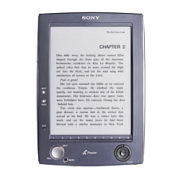


gomenasai, boku no nihongo hontou heta desu. Canadajin desu. PRS-500 kaimashita, hontou suki, manga wo yomemasu. http://
ima, PRS-500 ni nihongo no GANTZ yometai, demo takusan kanji wo yomemasen...
ima, PRS-500 ni nihongo no GANTZ yometai, demo takusan kanji wo yomemasen...
|
|
|
|
コメント(5)
I prefer to read the manga in pure .jpg format, I dislike to put them in pdf format as the quality goes down. As space isn't truly a trouble (I have a 2 Gb card) I prefer to simply read them directly in jpg
When in jpg I need to rename all the files, otherwise as there is no folder separations it will change the order of the chapters, so I need to rename the whole manga (recently I read Death Note manga which is 900 images long) The trouble is that when changing images in landscape mode, Large size, the next image always begins in the lower part of the image, not the upper part, so I need to scroll up of the image.
Both troubles (folder and begin on bottom of images) are trouble due to the firmware of Sony, I'm a little shocked to see that a soo good product as the PRS-500 has so poor software support and features.
humm, I will try to explain it better ^c ^
if you open a manga page(jpg) and put it on L size and in landscape you can only see the upper part of the image, which is okay, then as you read you scroll down on the image which is also very okay. Then you click on next page, but the next manga page is displayed in a way that you can only see the bottom part of the image, the upper part is hidden, then you must scroll up, read the top part and then scroll down to read the bottom part...
all that scrolling is a pain in the ass... it only needs to reset the page position on page change to arrange the trouble.
- mixiユーザー
- ログインしてコメントしよう!
|
|
|
|
Sony Reader 更新情報
-
最新のイベント
-
まだ何もありません
-
-
最新のアンケート
-
まだ何もありません
-
Sony Readerのメンバーはこんなコミュニティにも参加しています


人気コミュニティランキング

- 1位
- 相棒
- 59204人

- 2位
- 30代〜40代から友達作り【友活】
- 35850人
- 3位
- 40歳以上のおじさん&おばさん
- 14767人